Mobile apps collect more data than most users expect. Developers race to personalize experiences, train AI models and optimize revenue. That pressure pushes many apps to grab as much behavioral data as possible.
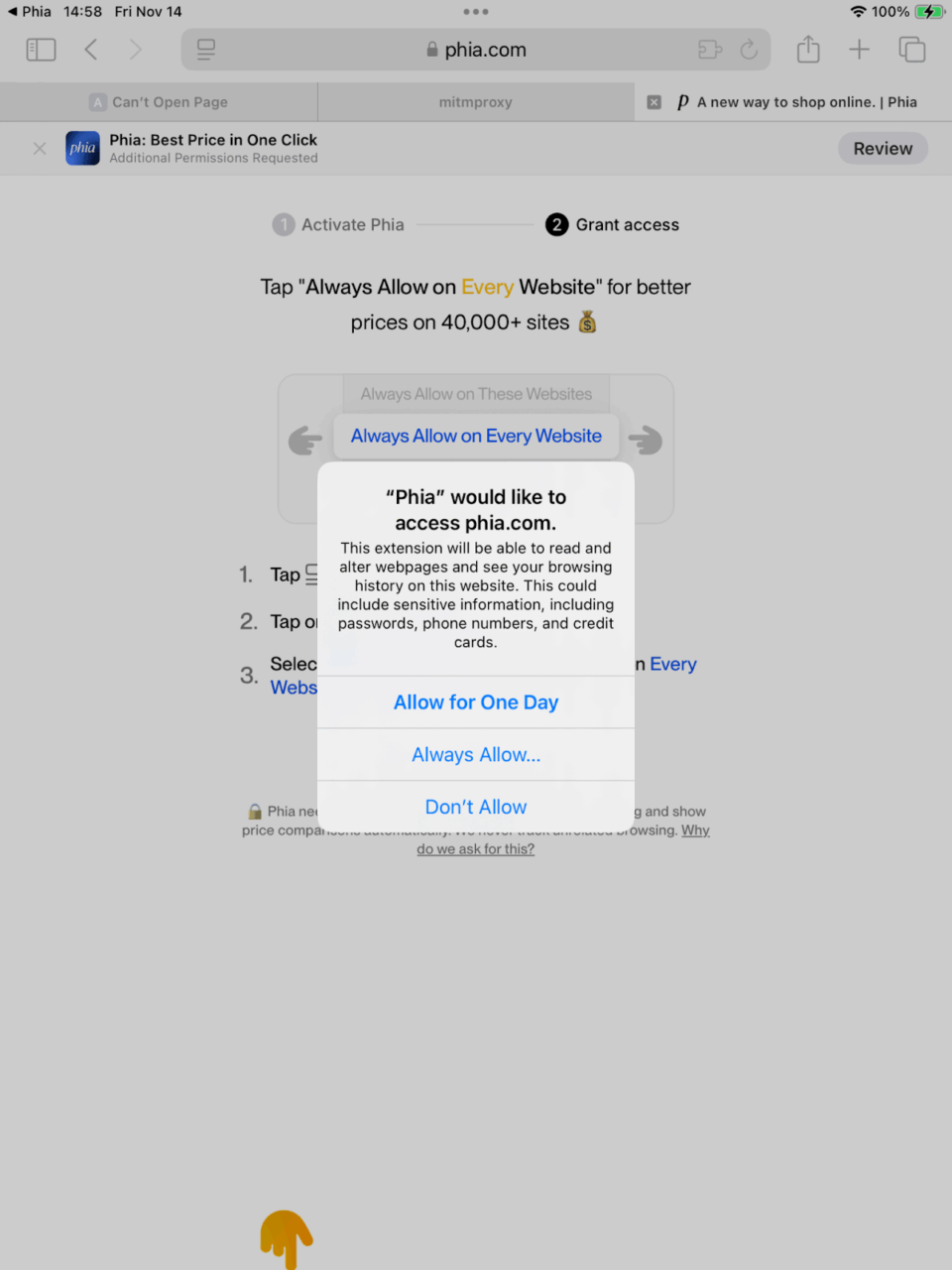
During a recent NowSecure investigation, we analyzed the AI-powered Phia iOS shopping app and discovered how quickly helpful features can turn into invasive data overreach. With one permission prompt, the app’s Safari extension gained the ability to inject code across thousands of sites, monitor browsing activity and gather signals from the device itself.
For enterprises, this trend creates serious privacy, compliance and security exposure. Before teams build or approve the next app, they need visibility into what those apps actually collect and how they operate under the hood. Phia is a fast-growing shopping app that helps users compare prices across thousands of retail and resale sites.
A Real-World Example of Data Overreach
To show how this plays out in the real world, we dug into the linked iOS Safari Web extension bundled with the upstart Phia mobile shopping app. Our analysis uncovered aggressive data collection practices that mirror — and in some cases, exceed — the capabilities previously identified in Chrome extension analysis.
The iOS application exhibits similar concerning characteristics. The app injects JavaScript, enables persistent tracking and can collect sensitive data across a wide range of websites depending on how users configure it.Below is a breakdown of what we found. You can find the complete analysis artifacts here.
Mobile apps now collect far more data than users realize — and the gap keeps widening.
Chrome Extension Summary
Security researcher Maahir Sharma documented that the Phia Desktop Chrome extension madeGraphQL calls to logCompleteHtmlToGcs, sending GZIP-compressed HTML content of every visited page to Google Cloud Storage. The API payload structure confirmed this behavior.
The extension’s background.js contained a function that executed this logging behavior on every tab visit, effectively creating a complete browsing history archive inside Phia’s cloud infrastructure.

iOS Safari Extension Analysis
Our analysis shows the Safari Web Extension bundled with the iOS app has capabilities nearly identical to the Chrome extension. We based this conclusion on static analysis of the extension’s manifest.json (which uses the WebExtensions format, with some iOS differences) and dynamic analysis of the running application.
Manifest Comparison
| Manifest Area | Chrome Behavior | Safari iOS Behavior | Technical Implications |
content_scripts.matches |
|
Safari prompts the user; once granted, scripts run on every navigation | Full DOM access of all granted websites |
content_scripts.world |
Executes in the page context | Safari honors MAIN world injection on iOS 15+ |
Scripts share the page’s JS heap, enabling credential access |
background.scripts |
Event pages wake on messages | Safari converts background scripts to event handlers via SFExtensionManager | Persistence through host app even when Safari closed |


Server-Side Whitelist
During use, the Safari extension loads a whitelist.json file containing two lists:
- Exclusions: ~ 60 domains, largely to email and banking providers
- Whitelist: ~29,000 retail and shopping sites with corresponding URL patterns.
Despite the attempt to create a whitelist with both exclusions and allowed domains, the application still collected data from sites not explicitly approved, and it’s unclear whether this behavior was intentional. Either way, it results in the collection of more sensitive data than most users would expect.
Key Security Observations from Manifest
- Four separate scripts run on every allowed page, one in MAIN world (reduced isolation).
- The extension uses Manifest V2, which Chrome deprecated but Safari still supports.
- A permissive Content Security Policy allows
unsafe-eval, enabling execution of arbitrary code. - web_accessible_resources exposes all extension files
("*")to websites, allowing potential user anonymization. - A native app bridge enables communication from web content → extension → native iOS app.
- Combined permissions
(webRequest + cookies +network metadata and cookie visibility across every granted site.) provide
Full analysis of the manifest is available here.
iOS App Observations
Fingerprinting installed apps
The Phia app’s Info.plist declares intent to query 78 URL schemes associated with common retail and shopping apps:

On startup, system logs show the app attempts to load as many of these schemes as iOS permits, likely to fingerprint which shopping apps users installed:

App Transport Security Settings
iOS enforces secure network transport by default through strict TLS requirements. The Phia app disables these protections globally in its Info.plist, removing Apple’s default safeguards for network traffic:

Why This Matters for CISOs & AppSec Leaders
This analysis shows how a single free app can gain deep visibility into a user’s browsing activity, device behavior and network patterns. As mobile apps and extensions grow more powerful, the gap between what users expect and what apps actually collect continues to widen.
Enterprises need stronger visibility, clearer guardrails and automated mobile application security testing and privacy testing to safeguard the expanding attack surface. Mobile app risk isn’t hypothetical — it affects every organization that makes or uses mobile apps.
Take the next step and discover how NowSecure helps mobile AppSec and DevSecOps teams detect data overreach and secure the apps they build and deploy.
Special thanks to Dawn Isabel for contributing to this analysis.