GnuPG, commonly known as GPG, is an open source implementation of the Pretty Good Privacy cryptography standard. It offers symmetric and asymmetric encryption for data at rest and in transit.
This article introduces how to use GPG, demonstrates its installation on common OSes and provides instructions for its use.
How does GPG protect data?
Encryption seeks to satisfy the following three goals:
- Authenticity. Guaranteeing the source of a message.
- Integrity. Guaranteeing a message did not change unexpectedly.
- Nonrepudiation. Guaranteeing the source of the message.
GPG satisfies all three goals by combining symmetric and asymmetric cryptography to protect stored files and digital communications.
Symmetric and asymmetric cryptography are critical components of today’s security and privacy strategies. Symmetric cryptography uses a single private key (shared secret) to both encrypt and decrypt data, while asymmetric cryptography uses a mathematically related public and private key pair. Data encrypted with one key can only be decrypted by the other — for example, data encrypted using the public key can only be decrypted using the related private key.
GPG combines these two approaches and enables users to ensure data privacy, source and integrity. As a result, GPG is widely used and supported.
Common GPG use cases
Consider the following ways to use GPG to secure data storage and transmission:
- Encrypted email for confidentiality.
- Digitally signed email for authenticity.
- Encrypted files for data confidentiality.
- Digitally signed software packages, scripts and other applications.
- Digitally signed Git commits.
Consider your own workflow to determine additional ways GPG can protect your information.
Install GPG
GPG is free and open source software, helping to ensure its security and stability. It is available for common platforms, including Linux, macOS and Windows.
Most Linux distributions include GPG by default. Use the gpg –version command to verify you have a current version. Use your distribution’s preferred package manager if GPG isn’t present.
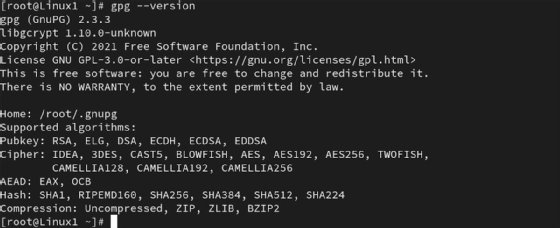
For Ubuntu, Debian Linux Mint and similar distributions, type:
sudo apt install gnupg
On Red Hat Enterprise Linux, Fedora, Rocky and similar distributions, type:
sudo dnf -y install gnupg
MacOS users can install GPG using the Homebrew package manager by typing:
brew install gnupg
MacOS users can also use the GPG Suite graphical application to manage encryption.
Those who prefer the Windows platform can access GPG two ways: GnuPG binary is the official installer from the GnuPG website, and Gpg4win is the graphical/command-line application.
How to use GPG for symmetric cryptography
Symmetric encryption offers the most straightforward management process. You must, however, be able to securely deliver the key to any remote connections where decryption needs to occur. This approach works best for data encryption scenarios on a single system or within a secure environment.
The simplest way to encrypt a file uses this command:
gpg -c private-file.txt
It results in an encrypted file named private-file.txt.gpg.
GPG prompts you to enter a passphrase to protect the file.
You can specify more detail, such as a specific file name, by using the following more complex command:
gpg --output new-private-file.txt.gpg --symmetric private-file.txt
To then decrypt the new-private-file.txt.gpg file, type:
gpg --output private-file.txt --decrypt private-file.txt.gpg
You can substitute the -o and -d flags for a little less typing. GPG automatically prompts for the passphrase you set for the private key.
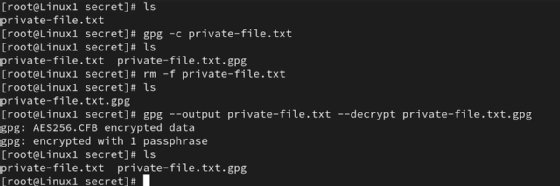

Use this process to protect data backup files, confidential information on shared computers or resources you’re transferring to and from remote storage devices.
Note that GPG generates a new version of the file during the encryption process. The original nonencrypted file remains on the drive. Consider securely deleting it using a command such as shred.
How to generate key pairs for asymmetric cryptography
Begin using GPG by generating a public-private key pair. These keys are mathematically related. With asymmetric cryptography, if you encrypt data with one key, you must decrypt it with the other key. Here are examples of the two options:
- Confidentiality. Encrypt with the public key, decrypt with the private key.
- Digital signatures, integrity. Encrypt with the private key, decrypt with the public key.
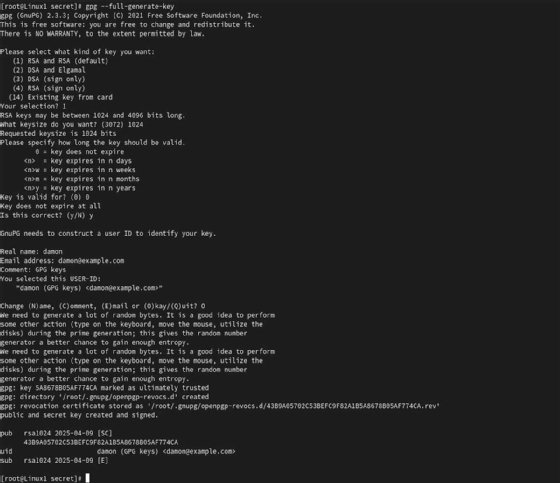
On a Linux system, type the following command to generate the key pair:
gpg --full-generate-key
You have various options to customize the key length, type and other settings. GPG prompts you to enter your name and email address as part of your key identity. You can also set a strong passphrase to protect your private key.
You will likely need to share your public key with other users so they can decrypt data encrypted using your private key. Use the following command to export the required public key information:
gpg --armor --export [email protected] > pubkey.asc
If you receive another user’s public key or need to provide instructions to a recipient of your public key, use this command to import it into your system:
gpg --import pubkey.asc
Verify the key exists by typing gpg –list-public-keys. The user’s public key enables you to decrypt data encrypted with the related private key.
How to use GPG for asymmetric cryptography
To encrypt a file using another user’s public key — therefore ensuring only that user can decrypt the data based on their possession of the related private key — type the following command:
gpg --output secret-file.txt.gpg --encrypt --recipient [email protected] secret-file.txt
This command specifies the name of the encrypted file — secret-file.txt.gpg — and the recipient’s email address — [email protected]. You are encrypting the secret-file.txt file in this example.
At the other end of the data transfer, the user enters the following command to begin the decryption process:
gpg --output secret-file.txt --decrypt secret-file.txt.gpg
That user enters the passphrase protecting their private key to complete the process.

Integrating GPG encryption into your daily routine can greatly enhance the security of your data. You already do backups, right? Now, you can encrypt those backups for greater confidentiality. You also conduct essential business using email. Learning how to use GPG to digitally sign messages adds a substantial layer of protection to communications.
Damon Garn owns Cogspinner Coaction and provides freelance IT writing and editing services. He has written multiple CompTIA study guides, including the Linux+, Cloud Essentials+ and Server+ guides, and contributes extensively to Informa TechTarget, The New Stack and CompTIA Blogs.