Apple continues to double down on security and privacy in iOS 26. This release introduces new frameworks, expands cryptographic protections and strengthens parental controls in ways both end users and developers will notice. Below is a breakdown of the most important updates, with a focus on how they work under the hood and what developers should keep in mind when integrating them into apps.
Stronger Device Connectivity with Wi-Fi Aware

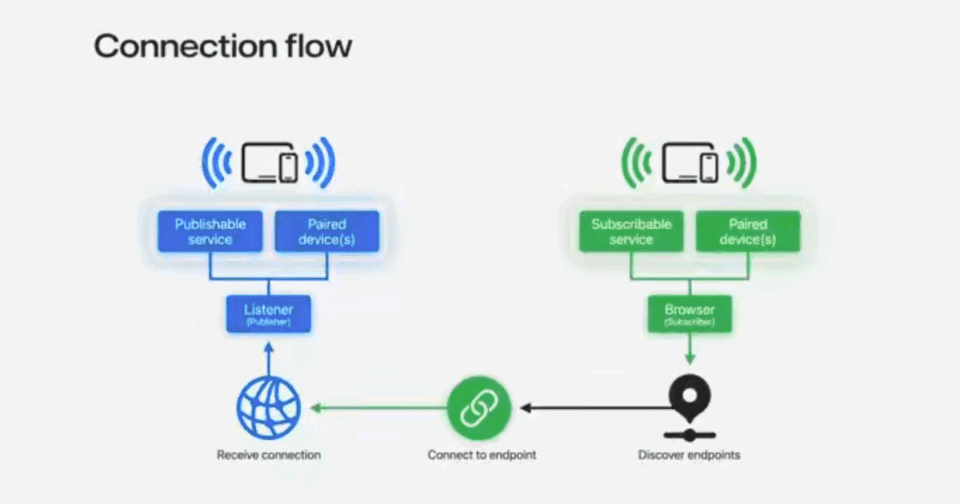
Wi-Fi Aware is a peer-to-peer networking framework that allows nearby devices to discover and connect without requiring a traditional access point or Internet connection. Devices form direct, encrypted links at runtime, making it ideal for local use cases such as media streaming, multiplayer gaming, accessory control and secure file transfer.
Connections are authenticated and encrypted at the Wi-Fi layer, eliminating the need for developers to build additional security protocols for link establishment. Once devices are paired through a one-time trust process, future connections are automatic and secure whenever devices are in range and running the app. Developers only need to manage two flows: pairing and connection.

Services discovered through Wi-Fi Aware must use unique names of 15 characters or fewer and can run over either TCP or UDP. Apple recommends preventing collisions by registering service names with IANA. Because Wi-Fi Aware is an open standard maintained by the Wi-Fi Alliance, apps can interoperate with non-Apple devices that implement the technology.

Moving Toward Quantum-Secure Cryptography
Quantum computing threatens traditional encryption by making brute-force attacks and key recovery more feasible. A common risk is “harvest now, decrypt later,” where encrypted traffic is intercepted today and decrypted in the future using quantum resources.

To counter this, iOS 26 enables TLS 1.3 client-side by default in recommended APIs such as URLSession and Network.framework. TLS 1.3 uses ephemeral key exchanges that are resistant to quantum-based attacks. Developers should migrate away from Secure Transport, which does not support quantum-secure TLS and is now considered legacy.
CryptoKit now supports post-quantum Hybrid Public Key Encryption (HPKE), which combines classical and post-quantum algorithms. HPKE uses ML-KEM for key encapsulation and ML-DSA for digital signatures, enabling stronger protection against both current and future threats.


These enhancements allow more secure client-server communication, especially for sensitive data such as health metrics. Apple services including CloudKit, Push Notifications, Safari, Maps, Weather, and iCloud Private Relay are already adopting quantum-secure TLS.
An example of a new implementation of quantum-secure encryption can be seen in the code below. In this specific scenario, the recipient shares the public key, and the sender gets created with the recipient’s public key. Then, the recipient is created using the sender’s encapsulated key parameter and some authenticated metadata. Last, the sender creates a ciphertext by encrypting the user’s sensitive data (health info, etc.) which is sent to the recipient, who decrypts it by opening it along with the authenticated metadata, effectively sending encrypted data from the sender to the recipient device.
let ciphersuite = HPKE.Ciphersuite.XWingMLKEM768X25519_SHA256_AES_GCM_256

// Recipient
let privateKey = try XWingMLKEM768X25519.PrivateKey.generate()
let publicKey = privateKey.publicKey

// Sender
var sender = try HPKE.Sender(recipientKey: publicKey, ciphersuite: ciphersuite, info: info)
let encapsulatedKey = sender.encapsulatedKey

// Recipient
var recipient = try HPKE.Recipient(privateKey: privateKey, ciphersuite: ciphersuite, info: info, encapsulatedKey: encapsulatedKey)

// Sender encrypts data
let ciphertext = try sender.seal(userData, authenticating: metadata)

// Recipient decrypts message
let decryptedData = try recipient.open(ciphertext, authenticating: metadata)
#expect(userData == decryptedData)
Protecting Children with New Age and Permission Tools
iOS 26 introduces new frameworks to help developers build age-appropriate experiences while safeguarding children’s privacy.
- Declared Age Range API: Instead of requesting a birthdate, apps can request an age range. This reduces exposure of personal data and allows developers to tailor features by maturity level. For example, apps can disable social-sharing features for younger users.

The API provides an enum with lower and upper age bounds, and cached responses are synced across devices. Parents can also manage disclosure frequency and permissions in Settings. If the user is under the age of majority, the API returns additional parental control parameters for finer-grained protections.


- PermissionKit: For apps with communication features, PermissionKit enforces parental approval workflows. Requests are presented in Messages as structured “questions” containing detail like usernames or handles. Parents can approve or deny requests directly within the conversation.
Developers can integrate PermissionKit to hide message previews, block sensitive content, and restrict interaction with unknown senders until parental approval is received. Together with Family Sharing, these APIs give parents visibility and control while ensuring developers provide compliant experiences.
Integrating Privacy Throughout Development
Apple encourages treating privacy as a lifecycle requirement. Best practices include:

- Planning: Minimize data collection and prioritize on-device processing.
- Design: Clearly explain data collection and provide contextual choices.

- Development: Use Apple frameworks to align front-end and back-end behaviors, such as CloudKit with end-to-end encryption.

Private Access Tokens validate legitimate requests without tracking users;

DeviceCheck to reduce fraud attempts, AdAttributionKit to measure campaign performance without requiring invasive tracking permissions and Core ML for on-device AI.
- Testing: Adopt structured privacy testing using Apple’s “testing pyramid.”


Advancing Beyond Passwords with Passkeys
Passwords remain weak and vulnerable to phishing, reuse and breaches. iOS 26 expands passkey adoption with new APIs:
- Account Creation API issues a passkey from the start, eliminating passwords. This API also integrates with credential managers to streamline sign-up experiences.

- Passkey Sync keeps credential managers up to date with changes like revoked passkeys.


Developers can also include the ability report when a password is no longer in use to ensure credential managers no longer offer outdated sign-in options.

- Automatic Passkey Upgrades migrate existing passwords to passkeys seamlessly.

With the adoption of automatic passkey upgrades, after the user signs in with their username and password they will receive a notification that a passkey has been created. Their password still works, but now they can also sign-in with their new, secure passkey. This gentle nudge towards more secure sign-in will help change-resistant users shift their mindset to begin trusting passkeys and start using them for all their accounts going forward.
- Credential Management Endpoints give credential managers visibility into adoption.

When viewing an account’s details in the Passwords app, a dialog will be displayed stating the website offers a passkey upgrade for the account, as well as provide the direct link to passkey enrollment. This provides another avenue for users to easily upgrade from passwords to passkeys.
- Import and Export lets users securely move passkeys between managers.
These improvements make passkeys easier to deploy and more appealing to users, accelerating the shift away from traditional passwords.
With iOS 26, Apple reinforces that privacy and security are core features, not optional extras.
A Note on UIKit and Document Handling
UIKit now allows apps to hand off non-native documents to third-party viewers or Quick Look. While this improves flexibility, it also raises risks such as:
- Sensitive data leakage if cached by external viewers
- Exposure of encrypted or restricted content without proper authorization
- Analytics or tracking by third-party viewers
- Phishing attempts in malicious documents
Developers should weigh these risks, implement safeguards like encryption and maintain transparency with users about how documents will be handled.
Final Thoughts
With iOS 26, Apple reinforces that privacy and security are core features, not optional extras. Wi-Fi Aware simplifies secure peer-to-peer connections, quantum-secure cryptography prepares developers for a post-quantum era, new APIs strengthen protections for children and expanded passkey support accelerates the move beyond passwords.
For developers, adopting these tools early improves security posture and aligns apps with Apple’s long-term vision for safer, more private digital experiences.As Apple strengthens mobile app security and privacy with iOS 26, developers and enterprises must keep pace to protect users and meet compliance requirements. NowSecure Platform delivers automated mobile application security testing and privacy testing to validate protections. Get a demo today to see how NowSecure Platform helps you build safer apps faster.